Automating Quality Control Processes with Prolis: Complete Guide to Modern Lab QC
Every result a laboratory releases carries a promise: that the number on the report reflects the patient’s true physiology, not an instrument drift, a reagent lot gone bad, or a step someone forgot to log. That promise is kept or broken by quality control. Yet in a surprising number of clinical, reference, and physician office laboratories, QC still runs on spreadsheets, paper logs, and someone’s memory of “the way we’ve always done it.”
This guide breaks down what automating quality control processes actually means inside a modern Laboratory Information System (LIS), why manual QC is a growing liability, and how Prolis LIS turns quality control from a compliance chore into a continuous, automated safeguard. Whether you run a physician office lab, a reference lab, or a high-volume clinical lab, you’ll walk away knowing exactly what to look for and what questions to ask before you automate your own QC workflow.
What Is Laboratory Quality Control, and Why Does It Matter So Much?
Laboratory quality control (QC) is the set of processes labs use to verify that testing equipment, reagents, and procedures are performing correctly before, during, and after patient samples are run. In practice, QC means running known control materials alongside patient samples, comparing the results against expected ranges, and confirming the analytical system is “in control” before results are released.
QC exists because instruments drift, reagents degrade, calibrations shift, and human steps get skipped. Without a disciplined QC process, a lab has no reliable way to know whether a result reflects the patient or a malfunctioning system. That’s why regulatory bodies including the Centers for Medicare & Medicaid Services (CMS) under the Clinical Laboratory Improvement Amendments (CLIA), and the College of American Pathologists (CAP) require documented QC procedures as a condition of certification and accreditation.
Why Manual Quality Control Puts Labs at Risk
Manual QC isn’t just slower it’s structurally weaker than an automated process. When control results live in binders, spreadsheets, or an analyzer’s local memory, several problems compound:
- Delayed detection. A drifting instrument may not be caught until a supervisor manually reviews the log hours or days later.
- Inconsistent rule application. Westgard rules and control limits get applied differently depending on who’s reviewing the data and how tired they are at 2 a.m.
- Incomplete audit trails. Paper logs get lost, edited without a trace, or simply never filled in during a busy shift.
- Reactive compliance. Labs scramble to reconstruct QC history right before a CAP or state inspection instead of maintaining continuous readiness.
- Held or delayed results. When QC failures aren’t caught immediately, entire result batches may need to be recalled or re-run, slowing turnaround time and frustrating ordering physicians.
None of these are hypothetical. They are the everyday friction points that push labs toward LIS-driven quality control automation and they’re exactly the gaps Prolis was built to close.
What Automated Quality Control Looks Like in a Modern LIS
Automating QC doesn’t mean removing human judgment from the process. It means giving your team real-time visibility and removing the manual busywork that causes errors to slip through. A modern, LIS-integrated QC program typically includes:
- Continuous monitoring of instrument calibration and maintenance schedules
- Automatic tracking of control samples across every run, shift, and operator
- Statistical visualization of performance trends over time
- Rule-based flagging of out-of-range values before results are released
- Time-stamped documentation of every QC action for audit purposes
When these functions live inside your LIS rather than in a separate spreadsheet or third-party tool, QC stops being a side task and becomes part of the natural testing workflow checked automatically every time a result is generated.
How Prolis Automates Quality Control From Sample to Sign-Off
Prolis builds quality control directly into the LIS workflow, so QC isn’t a separate system your staff has to remember to check. Here’s how it works in practice.
Real-Time QC Monitoring
Prolis tracks control samples and QC data as tests are processed not after the fact. The system continuously checks results against pre-set control rules, so any deviation is caught the moment it happens rather than during a manual end-of-shift review. That means lab techs and supervisors can intervene immediately, before a compromised result ever reaches a physician.
Automated Levey-Jennings Charting
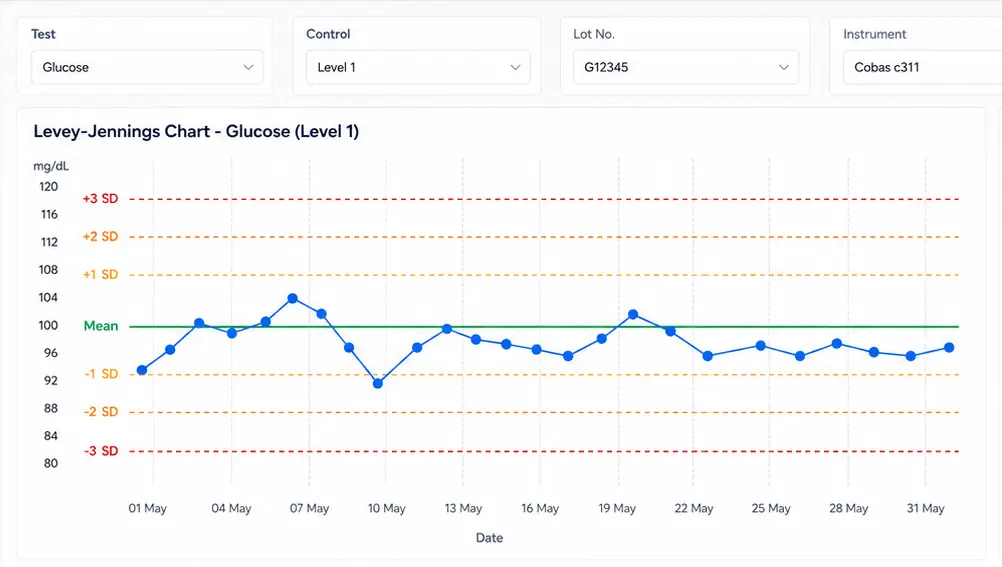
Prolis includes built-in Levey-Jennings chart generation, one of the most trusted statistical tools in laboratory QC. The system automatically plots control results over time for each instrument and test, making it easy to visualize trends, spot early drift, and respond before a small shift becomes an out-of-control run. Charts are generated without any manual setup, saving techs the time they’d otherwise spend building charts by hand.
Predefined Rules and Automatic Flagging
Every lab has its own QC thresholds and risk tolerance. Prolis lets labs configure their own control rules including industry-standard Westgard rules and applies them automatically to every result as it’s processed. When a rule is violated, the system immediately flags the issue and triggers an alert, with notifications routed based on test type, instrument, or staff role.
Why Rule-Based Flagging Matters
Westgard multi-rule QC combines several statistical checks (such as 13s, 22s, and R4s rules) to distinguish real analytical problems from normal random variation. Applying these rules manually is time-consuming and error-prone; automating them ensures every result is evaluated the same way, every time, regardless of who’s on shift.
Maintenance and Calibration Alerts
Prolis tracks instrument calibration schedules and maintenance logs, sending reminders when actions are due and logging completed tasks automatically. This creates a digital record that supports compliance with CLIA, CAP, and internal standard operating procedures (SOPs) and helps prevent costly downtime or out-of-range results caused by missed maintenance.
QC Reporting and Audit Trails
Whether you need a monthly QC summary for internal review or a real-time report for an inspector standing in your lab, Prolis generates it on demand. Reporting capabilities include:
- Daily, weekly, and monthly QC performance reports
- Instrument-specific logs and historical control sample results
- Full, time-stamped audit trails for every QC-related action
All reports are exportable, ensuring easy traceability whenever your lab needs to demonstrate regulatory readiness.
Manual QC vs. Automated QC with Prolis: A Side-by-Side Comparison
| QC Task | Manual Process | Automated with Prolis |
|---|---|---|
| Control result review | Reviewed periodically by staff | Monitored continuously in real time |
| Levey-Jennings charting | Built manually in spreadsheets | Auto-generated per instrument and test |
| Westgard rule application | Applied inconsistently by hand | Applied automatically to every result |
| Calibration tracking | Logged on paper or shared sheets | Scheduled, tracked, and alerted automatically |
| Audit trail | Reconstructed before inspections | Maintained continuously and exportable anytime |
| Issue detection time | Hours to days | Immediate |
Key Benefits of QC Automation in Prolis
Labs that move QC into Prolis consistently report measurable operational gains, including:
- Faster issue detection and resolution — problems are flagged as they occur, not discovered later
- Reduced reliance on paper records — freeing techs from manual logging
- Improved confidence in instrument performance — backed by continuous, visualized data
- Streamlined audits and inspections — with reports ready on demand
- Fewer delayed results — because QC holds are resolved faster
In short, QC becomes continuous rather than reactive. Problems are caught early, addressed quickly, and documented automatically without adding extra work to your team’s day.
CLIA, CAP, and Regulatory Compliance: How Automation Helps
The Clinical Laboratory Improvement Amendments (CLIA), jointly supported by CDC, CMS, and the FDA, require every U.S. laboratory testing human specimens to maintain documented quality control procedures covering the pre-analytic, analytic, and post-analytic phases of testing. CAP accreditation layers additional documentation and traceability requirements on top of that federal baseline.
Meeting these requirements manually means someone has to remember to log every calibration, every control run, and every corrective action consistently, for every instrument, every day. An automated LIS QC module removes that burden by generating the documentation as a natural byproduct of everyday testing, so your lab is inspection-ready every day of the year, not just the week before a survey.
How to Implement Automated QC in Your Lab: A Practical Roadmap
1. Audit Your Current QC Process
Map out every instrument, control material, and rule your lab currently uses. Identify where manual steps introduce delay or risk.
2. Define Your Control Rules
Decide which Westgard rules (or custom thresholds) apply to each analyte and instrument, and document acceptable ranges.
3. Configure Your LIS
Work with your LIS provider to build these rules into the system, connect instruments for real-time data capture, and set up alert routing by role.
4. Train Staff on the New Workflow
Automation only pays off if staff trust and use it. Train techs on how alerts appear, how to respond to flagged results, and how to pull reports.
5. Monitor, Review, and Refine
Use the Levey-Jennings trends and QC reports to periodically reassess whether your rules and ranges still fit your instruments and testing volume.
Common QC Automation Mistakes Labs Should Avoid
- Treating automation as “set and forget.” Control rules still need periodic review as instruments, reagent lots, and volumes change.
- Ignoring alert fatigue. Poorly tuned alert thresholds can flood staff with notifications, causing real issues to get lost in the noise.
- Skipping staff training. A powerful QC engine is only as good as the team’s understanding of how to act on its alerts.
- Choosing a QC tool that isn’t LIS-integrated. Standalone QC software that doesn’t talk to your LIS recreates the same data silos manual QC was supposed to fix.
What to Look for When Choosing an LIS for QC Automation
Not every LIS handles quality control the same way. When evaluating a platform, look for:
- Native, built-in Levey-Jennings charting not a bolt-on export to a third-party tool
- Configurable Westgard multi-rule support
- Real-time instrument integration for immediate flagging
- Automated calibration and maintenance reminders
- Exportable, time-stamped audit trails ready for CLIA and CAP inspections
- Role-based alerting so the right person is notified at the right time
Prolis was designed around exactly this checklist, giving labs a single system where testing, QC, compliance documentation, and reporting all live together instead of across disconnected tools.
Quality Control, Built Into the System
Quality control isn’t just a regulatory requirement it’s your lab’s reputation. Labs are judged by the reliability of their results, and reliability comes from consistency. By automating quality control processes with Prolis, your lab gains real-time monitoring, automated Levey-Jennings charting, configurable Westgard rules, calibration tracking, and audit-ready reporting all built into the same system your team already uses to process results.
With QC automated and baked into the daily workflow, your lab can spend less time catching up on paperwork and more time delivering answers clinicians and patients can trust.
Ready to see automated QC in action? Book a personalized Prolis LIS demo today and see how real-time quality control fits into your lab’s exact workflow.
Frequently Asked Questions About Automating Lab Quality Control
What is automated quality control in a laboratory information system?
Automated quality control is a built-in LIS function that continuously monitors control sample results, applies statistical rules like Westgard rules, and flags out-of-range values in real time without requiring staff to manually review spreadsheets or paper logs.
What are Levey-Jennings charts used for?
Levey-Jennings charts plot control results over time against expected mean and standard deviation limits, helping lab staff visualize trends, spot instrument drift, and catch quality issues before they affect patient results.
What are Westgard rules, and why do they matter for QC?
Westgard rules are a set of statistical criteria used to interpret QC data and decide whether a testing run is “in control” or “out of control.” Applying them consistently helps labs distinguish genuine analytical problems from normal random variation.
Does CLIA require automated quality control?
CLIA regulations require documented QC procedures but don’t mandate a specific software system. However, automating QC through your LIS makes it significantly easier to meet CLIA’s documentation and traceability requirements consistently, every day.
How does Prolis help labs prepare for CAP or CLIA inspections?
Prolis maintains continuous, time-stamped audit trails of every QC action, calibration, and maintenance event, and can generate daily, weekly, or monthly reports on demand so labs stay inspection-ready year-round instead of scrambling before a survey.
Can Prolis integrate quality control with lab instruments directly?
Yes. Prolis connects to lab instruments to capture QC and control sample data in real time, applying pre-configured rules automatically as results are generated rather than after the fact.