How to Train Your Staff on a New LIS: A Step-by-Step Guide
Rolling out a new Laboratory Information System (LIS) is one of the highest-stakes technology projects a lab will ever undertake. The software itself rarely fails a go-live the people using it do, when training is rushed, generic, or treated as an afterthought. If your staff can’t confidently accession a sample, release a result, or troubleshoot an interface error on day one, turnaround times slip, errors creep in, and confidence in the new system erodes fast.
This guide breaks down exactly how to train your staff on a new LIS using a structured, role-based approach that laboratory directors, LIS administrators, and quality managers can put into action immediately whether you’re moving from paper-based records, migrating from a legacy LIMS, or switching vendors entirely.
You’ll learn how to build a training timeline, structure role-specific curricula, satisfy CLIA and CAP competency documentation requirements, avoid the most common rollout mistakes, and measure whether your training actually worked.
Why LIS Training Deserves Its Own Strategy (Not Just a Kickoff Call)
A Laboratory Information System touches nearly every function in the lab accessioning, specimen tracking, quality control, result reporting, billing, and regulatory documentation. When training is treated as a one-hour vendor walkthrough, labs typically see three predictable problems:
- Workarounds replace workflows. Staff who don’t trust the new system revert to spreadsheets, sticky notes, or manual logs defeating the purpose of the upgrade.
- Errors spike immediately post-go-live. Mis-keyed accession numbers, missed QC flags, and delayed result releases are almost always training gaps, not software bugs.
- Compliance exposure increases. Under CLIA, every person performing non-waived testing must have documented competency and an LIS transition changes how that competency is demonstrated and recorded.
Framing training as a structured program not a single event is the single biggest predictor of a smooth transition.
Step 1: Run a Training Needs Analysis Before You Build Anything
Before scheduling a single session, map out who needs to know what. A training needs analysis (TNA) prevents the most common failure mode: over-training everyone on every module.
Ask three questions for each role in the lab:
- Which LIS modules will this role actually touch day to day?
- What is their current comfort level with digital systems?
- What compliance or documentation requirements apply to this role specifically?
This table becomes your training blueprint and later, your audit trail for competency documentation.
| Role | Core LIS Functions to Train On | Typical Training Time |
|---|---|---|
| Accessioning staff | Order entry, barcode/label generation, specimen routing, add-on tests | 3–5 hours |
| Medical technologists / technicians | Result entry, QC review, instrument interfacing, critical value flags | 6–10 hours |
| Pathologists / lab directors | Result review, sign-off workflows, report templates, amendments | 2–4 hours |
| Billing and coding staff | Claim generation, CPT/ICD mapping, payer rules, denial workflows | 4–6 hours |
| Front desk / client services | Patient registration, insurance capture, requisition scanning | 2–3 hours |
| IT / super users | Interfaces (HL7), user provisioning, troubleshooting, reporting tools | 15+ hours |
Step 2: Build a Phased Rollout Plan
Training without a rollout plan creates confusion about when people are expected to be proficient. A phased plan keeps expectations realistic and gives staff room to build confidence before the system goes fully live.
Phase 1 — Pilot Group
Select a small cross-functional team (typically 5–10 staff across accessioning, testing, and reporting) to test the system on non-critical or historical data. This group surfaces workflow gaps before they hit the entire lab.
Phase 2 — Parallel Run
Run the new LIS alongside your existing system or paper process for a defined window (commonly 1–3 weeks). This lets staff:
- Practice real workflows without risking live patient data integrity
- Compare output accuracy between the old and new systems
- Build muscle memory before the safety net is removed
Phase 3 — Full Go-Live
Once parallel-run accuracy metrics meet your threshold (many labs target 98–100% concordance between systems), transition fully, with super users and vendor support on standby for the first 1–2 weeks.
Phase 4 — Stabilization
The 30–60 days after go-live, focused on reinforcement, error tracking, and closing knowledge gaps covered in detail in Step 5.
Step 3: Train by Role, Not by Feature List
The single biggest training mistake labs make is walking every employee through every screen in the LIS, regardless of whether they’ll ever use it. This overwhelms staff and buries the 20% of functionality that 80% of users need every day.
Instead, structure training around workflows people actually perform:
- Accessioners need order entry, specimen labeling, and routing — not billing rules or QC configuration.
- Technologists need result entry, QC flagging, and instrument interface troubleshooting — not report template design.
- Pathologists need review and sign-off screens, amendment workflows, and critical value protocols.
- Billing teams need claims, coding crosswalks, and denial management screens.
Role-based training also maps cleanly onto role-based access control (RBAC) in most modern LIS platforms, so what staff are trained on matches exactly what they’re permitted to touch in the live system reducing both error risk and audit exposure.
Use Scenario-Based Training, Not Screen Tours
Adult learners retain far more from doing than from watching. Instead of a click-through demo, give each role a realistic scenario to complete in a sandbox environment:
- “Accession this STAT specimen, flag it as urgent, and route it to chemistry.”
- “Enter this result, respond to the critical value alert, and document the callback.”
- “Process this denied claim and resubmit with the corrected code.”
Scenario-based practice surfaces confusion immediately while a facilitator is still in the room to correct it.
Step 4: Build Internal Champions with a Train-the-Trainer Model
Your LIS vendor’s implementation team will not be embedded in your lab forever. Long-term proficiency depends on internal super users who:
- Complete training early and reach proficiency ahead of the rest of staff
- Serve as the first point of contact for day-to-day questions
- Translate vendor/system terminology into your lab’s specific workflow language
- Reduce dependency on paid vendor support hours after go-live
How to select super users:
- Choose people who are already informal go-to resources on their shift not necessarily the most senior staff.
- Aim for at least one super user per shift, per department, so coverage doesn’t collapse when someone is off.
- Give super users direct access to the vendor’s implementation or support team so they can escalate quickly.
Labs that skip this step tend to see support tickets pile up in the first month, because every question routes to one overloaded LIS administrator instead of being resolved at the bench.
Step 5: Reinforce Learning After Go-Live (This Is Where Retention Actually Happens)
Formal training only gets staff to baseline competence. Real fluency builds during the first 30–90 days of actual use which is exactly when most labs stop investing in training. Build reinforcement into your plan from day one:
- Quick-reference guides and short video walkthroughs placed at workstations or linked inside the LIS help center for in-the-moment lookup.
- Daily huddles for the first week, then weekly check-ins for the first month to surface friction points before they become workarounds.
- A visible feedback channel a shared form or channel where staff can flag confusing screens or repeated errors.
- Scheduled “office hours” with a super user or vendor trainer for troubleshooting outside of formal sessions.
- Error and near-miss tracking specifically tagged as “training-related” during the stabilization period, so you can tell whether a recurring issue is a system bug or a knowledge gap.
Reinforcement is what separates labs that get lasting ROI from the new LIS from labs that quietly slide back into manual workarounds three months later.
Don’t Forget: LIS Training and CLIA Competency Are Linked
An LIS transition changes the tools your staff use to perform testing which means it directly intersects with regulatory competency requirements. Under CLIA, anyone performing non-waived testing must have documented competency assessed twice in their first year and annually after that, covering six required elements, including direct observation of test performance and review of how results are recorded and reported.
Practical implications for your LIS training plan:
- Document LIS-specific training separately from general competency, but make sure your competency assessments reflect the new workflows (e.g., how QC and critical values are now flagged in the new system).
- Update your SOPs before go-live, not after inspectors will expect your written procedures to match how staff actually work in the new system.
- Keep a training completion log (who was trained, on what modules, by whom, and when) as part of your implementation records. This becomes valuable evidence during CAP or state inspections.
Treating LIS training and CLIA competency as two separate, disconnected processes creates duplicate work and audit risk. Build them together.
Common LIS Training Pitfalls (and How to Fix Them)
| Pitfall | Why It Happens | Fix |
|---|---|---|
| Training scheduled too close to go-live | Vendor timelines get compressed | Start orientation and demos 4–6 weeks before go-live |
| One-size-fits-all training | Easier to schedule a single session for everyone | Segment by role and workflow, even if it takes more sessions |
| No sandbox/practice environment | Assumed unnecessary or unavailable | Confirm test-environment access with your vendor before training begins |
| No designated super users | Assumed IT or vendor will cover ongoing support | Identify and train champions in week one of the project |
| No post-go-live check-ins | Team considers training “done” after go-live | Schedule reinforcement touchpoints at 1, 2, and 4 weeks out |
| Feedback collected but not acted on | No clear owner for follow-up | Assign one person to triage and close the loop on feedback weekly |
How to Measure Whether Your LIS Training Actually Worked
Training effectiveness shouldn’t be a guess. Track a small set of metrics before and after go-live to know whether your program is working:
- Turnaround time (TAT) for common test types, compared pre- and post-go-live
- Error/correction rate for accessioning, result entry, and billing in the first 30, 60, and 90 days
- Parallel-run concordance rate between old and new systems during the pilot phase
- Support ticket volume and resolution time, especially tickets tagged as “how do I…” versus true system bugs
- Staff confidence surveys at 2 weeks and 30 days post-go-live a simple 1–5 self-rated scale by module is often enough to spot lingering gaps
If error rates and support tickets are still climbing 60 days post-go-live, that’s a signal to add another round of role-specific reinforcement rather than assuming staff will “get there eventually.”
Sample 6-Week LIS Training Timeline
| Week | Focus |
|---|---|
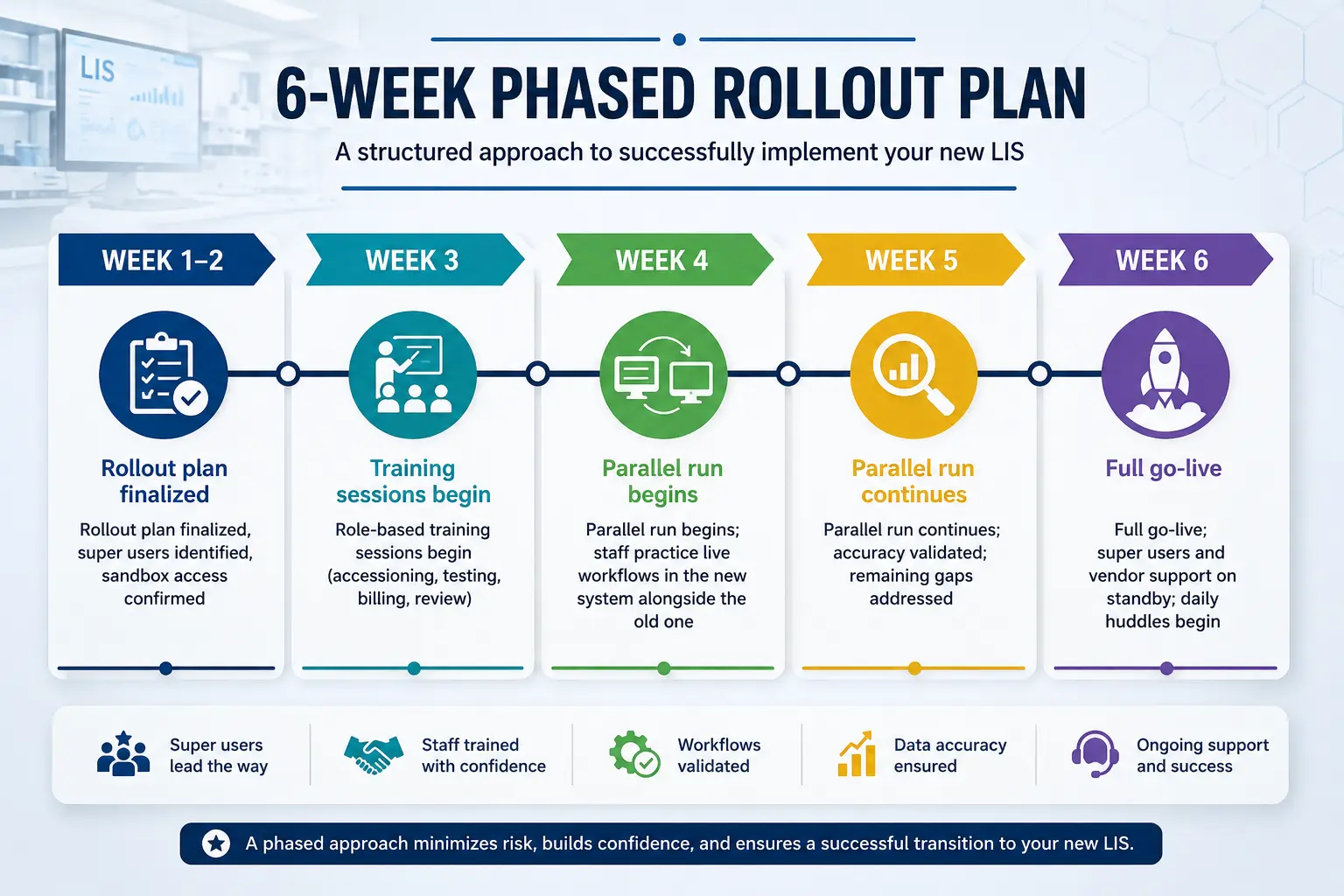
| Week 1–2 | Rollout plan finalized, super users identified, sandbox access confirmed |
| Week 3 | Role-based training sessions begin (accessioning, testing, billing, review) |
| Week 4 | Parallel run begins; staff practice live workflows in the new system alongside the old one |
| Week 5 | Parallel run continues; accuracy validated; remaining gaps addressed |
| Week 6 | Full go-live; super users and vendor support on standby; daily huddles begin |
| Weeks 7–10 | Stabilization: weekly check-ins, error tracking, reinforcement training as needed |
Conclusion: Training Is the Real Implementation
The technology behind a new LIS matters but it’s your staff’s confidence and competence that determine whether the rollout actually delivers faster turnaround times, cleaner compliance documentation, and fewer errors. A structured, role-based training program, backed by a parallel run, internal super users, and deliberate post-go-live reinforcement, turns a stressful transition into a genuine operational upgrade.
If you’re planning an LIS transition and want a training framework built around your lab’s specific workflows and staffing model, talk to your implementation team early the plan you build in the first two weeks of the project will shape how smoothly the next six go.
Frequently Asked Questions
How long does it take to train staff on a new LIS?
Most labs need 4–6 weeks for structured training, including a parallel run, though timelines vary by lab size and the number of departments using the system. Simple, single-department rollouts can be faster; multi-site or multi-department labs often need 8–12 weeks.
What is a parallel run in LIS implementation?
A parallel run is a period where staff use the new LIS and the previous system (or paper process) side by side, allowing them to practice real workflows and validate accuracy before fully switching over.
Who should be a super user during an LIS rollout?
Super users should be staff who are already informal go-to resources on their team, not necessarily the most senior employees. Ideally, every shift and department has at least one trained super user available.
Does LIS training count toward CLIA competency requirements?
LIS training is not a substitute for CLIA competency assessment, but the two should be aligned. Competency assessments must still cover all six required elements under CLIA, and your SOPs and assessment tools should reflect how staff now perform those tasks in the new system.
What’s the biggest mistake labs make when training staff on a new LIS?
Training everyone on every feature at once, instead of segmenting training by role. This overwhelms staff and buries the specific workflows they’ll actually use daily.
How do you know if LIS training was effective?
Track turnaround time, error/correction rates, support ticket volume, and staff confidence surveys at 30 and 60 days post-go-live. Rising error rates or ticket volume after that window signal a need for additional reinforcement training.