5 Ways to Use LIS Data for Better Compliance and Quality Control
LIS data for compliance and quality control means using the results, QC records, user activity logs, and workflow timestamps stored in your laboratory information system to prove regulatory compliance and to catch quality problems early. The five most effective ways to do this are real-time QC monitoring, automated audit trails, configurable compliance rules, data-driven quality improvement, and centralized inspection-ready reporting.
Most labs already collect all of this data. The difference between a lab that scrambles before an inspection and one that walks in confident is usually not the data itself. It is whether anyone is using it.
This guide walks through each of the five approaches with practical examples, the regulations behind them, and the metrics worth tracking. Whether you run a physician office lab, a reference lab, or a toxicology or pathology operation, you will find steps you can apply this quarter.
Key Takeaways
- Your LIS holds the evidence regulators and accreditors ask for: QC records, user actions, corrective actions, and turnaround times.
- Real-time QC monitoring catches drift before it reaches patient results.
- Audit trails only help if they are complete, time-stamped, and easy to search.
- Rules built into the workflow prevent errors, while manual checks only find them afterward.
- Trend analysis turns compliance from a checklist into a driver of continuous improvement.
Table of Contents
- Why LIS data matters for compliance and QC
- 1. Real-time QC monitoring and documentation
- 2. Automated audit trails for regulatory readiness
- 3. Configurable rules that enforce compliance
- 4. Data-driven quality improvement
- 5. Centralized reporting for inspectors and leadership
- Common mistakes labs make with LIS data
- A practical 90-day roadmap
- What to look for in a compliance-ready LIS
- Frequently asked questions
Why LIS Data Matters for Compliance and Quality Control
Clinical laboratories operate under layered oversight. In the United States, the Clinical Laboratory Improvement Amendments (CLIA) set the baseline quality standards, and the rules are codified in 42 CFR Part 493. Many labs also pursue accreditation from the College of American Pathologists (CAP), work to ISO 15189, or follow state requirements. On top of that, patient data falls under the HIPAA Security Rule.
Each of these frameworks asks a version of the same question: can you prove it? Can you prove the controls were acceptable before patient testing? Can you prove who released a result? Can you prove a problem was found, fixed, and reviewed?
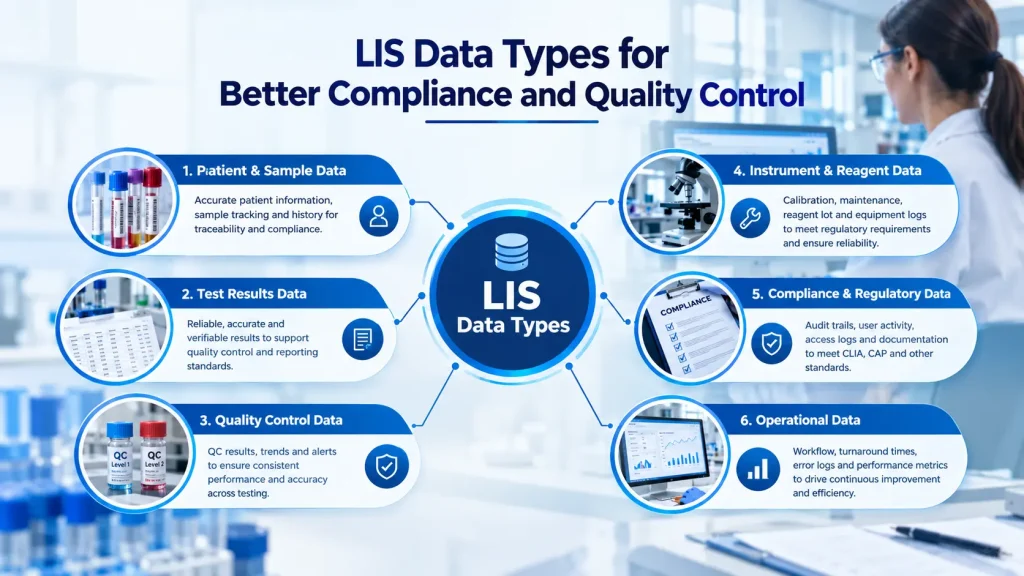
A laboratory information system (LIS) answers those questions because it records the work as it happens. The table below shows the main categories of LIS data and what each one supports.
| LIS Data Type | What It Captures | Compliance or QC Use |
|---|---|---|
| QC results | Control values, lot numbers, instrument, operator | Accept/reject decisions, trend charts, corrective action |
| Audit logs | User, action, date, time, and reason | Traceability, data integrity, HIPAA audit controls |
| Specimen tracking | Accession, receipt, storage, and processing timestamps | Chain of custody, pre-analytic quality |
| Result and report data | Review, verification, release, and amendments | Report accuracy, corrected report history |
| Workflow timestamps | Time between each process stage | Turnaround time analysis, bottleneck detection |
| Instrument and maintenance data | Interface activity, downtime, service events | Equipment reliability, root cause analysis |
1. Real-Time QC Monitoring and Documentation
Quality control is the daily proof that your testing process is working. It is also one of the first places inspectors look. Paper logs and spreadsheets can meet the requirement, but they make it easy to miss a shift, skip a signature, or discover a trend two weeks too late.
What real-time QC monitoring looks like
When QC results flow from the analyzer into the LIS through instrument integration, the system can evaluate each value the moment it arrives. That removes manual transcription errors and gives your team immediate feedback.
- Automatic out-of-range alerts tell the bench technologist to stop and investigate before patient results are released.
- Levey-Jennings charts plot control values against the mean and standard deviation limits so drift is visible at a glance.
- Multirule evaluation applies Westgard-style rules to flag both random and systematic error.
- Time-stamped resolution logs record who investigated, what was done, and when patient testing resumed.
Common Westgard rules and what they signal
| Rule | What Triggers It | Typical Meaning |
|---|---|---|
| 1-3s | One control exceeds ±3 SD | Random error or a gross problem |
| 2-2s | Two consecutive controls exceed the same ±2 SD limit | Systematic error |
| R-4s | One control above +2 SD and another below -2 SD in the same run | Random error |
| 4-1s | Four consecutive controls exceed the same ±1 SD limit | Emerging systematic shift |
| 10x | Ten consecutive controls fall on one side of the mean | Bias or calibration drift |
You can read the original reasoning behind these rules at Westgard QC. The exact rules you apply should match your test method, your control frequency, and your written QC plan.
Why this matters for compliance
CLIA requires labs to verify that control procedures detect immediate errors and monitor accuracy and precision over time. For many quantitative tests, that includes running control materials at defined intervals, and labs using an Individualized Quality Control Plan (IQCP) must document their risk assessment and plan. An LIS keeps that evidence together and time-stamped, so you are not reconstructing it from three different places.
For a deeper look at how automation changes daily QC work, see our guide on automating quality control processes with Prolis.
2. Automated Audit Trails for Regulatory Readiness
An audit trail is a secure, chronological record of who did what, when, and, where appropriate, why. It is the backbone of data integrity. If a result was edited, a report was amended, or a QC value was excluded, the trail should show it without anyone needing to remember.
What a strong lab audit trail should capture
- User identity and login activity
- Specimen receipt, accessioning, and status changes
- Result entry, edits, deletions, and the original value
- Review, verification, and release of reports
- Corrected or amended report history
- Changes to reference ranges, test definitions, and system configuration
The regulations behind audit trails
Several frameworks point toward the same expectation:
- The HIPAA Security Rule includes audit controls, meaning mechanisms to record and examine activity in systems that contain electronic protected health information.
- 21 CFR Part 11 sets expectations for secure, time-stamped electronic records and signatures where FDA-regulated work is involved.
- CLIA and CAP requirements expect traceable records for specimens, results, and corrections.
How to use audit data beyond inspections
Audit logs are not just a defensive tool. Reviewing them on a schedule can reveal:
- Users with unusually high edit or override counts
- Results released outside normal review workflows
- Shared logins or access that no longer matches a person’s role
- Repeated corrections tied to one test, one instrument, or one shift
A monthly audit-log review, even a short one, shows inspectors that you monitor your own system instead of waiting to be asked.

3. Configurable Rules That Enforce Compliance Standards
Finding an error during an inspection is costly. Preventing it at the bench is much cheaper. Configurable business rules turn your written procedures into system behavior, so compliance does not depend on everyone remembering every step every time.
Examples of rules that protect quality
- QC gating: hold patient results until the required controls for that run have been accepted.
- Accession completeness: block specimen entry when required fields such as ordering provider, collection time, or specimen type are missing.
- Supervisory review: route critical, abnormal, or amended results to a qualified reviewer before release.
- Test-specific protocols: enforce cutoff values, dilution checks, or confirmation testing requirements.
- Delta checks: flag a result that differs sharply from the patient’s previous result, which can reveal a mislabeled or mixed-up specimen.
- Critical value workflows: require documented notification, including who was told and when.
Autoverification: use it carefully
Autoverification lets the LIS release results automatically when they meet defined criteria, such as passing QC, falling within a set range, and showing no instrument flags. It reduces manual review and speeds turnaround time. It also needs validation, documented criteria, and periodic review. The Clinical and Laboratory Standards Institute (CLSI) publishes guidance on designing and validating these rules.
Rules versus reminders
| Approach | How It Works | Risk |
|---|---|---|
| Manual reminder | Staff remember to check a policy | Depends on memory, workload, and training |
| System-enforced rule | The LIS blocks or routes the action | Needs validation and periodic review, but it is applied consistently |
Document each rule, who approved it, when it went live, and when it was last reviewed. That documentation is itself compliance evidence.
4. Data-Driven Quality Improvement
Passing an inspection tells you that you met a minimum standard on a given day. It does not tell you where your process is wasting time, drifting, or heading toward failure. LIS analytics closes that gap.
Questions your LIS data can answer
- Which instrument or reagent lot has the most QC failures?
- Where do specimens wait longest between receipt and result?
- Which rejection reasons, such as hemolysis or insufficient volume, appear most often, and from which collection sites?
- Are corrected reports clustering around a test, a shift, or a specific step?
- Does instrument downtime line up with overdue maintenance?
- Which staff members would benefit from targeted retraining?
A simple example
Imagine your chemistry analyzer produces a 2-2s flag twice in one month on the same assay. On its own, each event looks minor. When you filter LIS QC data by reagent lot, you find both flags started right after a new lot went live. That points to a lot-to-lot issue rather than an operator problem. You contact the manufacturer, document the investigation, and switch lots before patient results are affected.
Without searchable data, that pattern could stay hidden for months.
Metrics worth tracking
| Metric | Why It Matters | Review Frequency |
|---|---|---|
| QC failure rate by test and lot | Reveals reagent, calibration, or instrument issues | Weekly or monthly |
| Turnaround time (TAT) by stage | Finds bottlenecks in pre-analytic, analytic, and post-analytic steps | Weekly |
| Specimen rejection rate | Highlights collection and transport problems | Monthly |
| Corrected report rate | Signals process errors that reach the final report | Monthly |
| Critical value notification time | Shows patient safety performance | Monthly |
| Proficiency testing results | Confirms accuracy against peer laboratories | Each event |
| Instrument downtime | Links reliability to maintenance schedules | Monthly |
Choose a small set of metrics, review them at a regular meeting, and assign an owner to each one. A short list that gets acted on is more useful than a large dashboard nobody opens.
Tip: turn findings into corrective and preventive actions
When analytics shows a problem, record the finding, the root cause, the action taken, and a follow-up date to check that it worked. Those records show accreditors that your quality system actually closes the loop.
5. Centralized Reporting for Inspectors and Leadership
When an inspector asks for six months of QC records, a list of corrected reports, or evidence of personnel access, the fastest answer is a report you can generate on demand. The slowest is a search through binders, shared drives, and email.
What inspection-ready reporting includes
- QC summaries and charts by test, instrument, and date range
- Corrective action and out-of-range investigation logs
- Proficiency testing history and follow-up
- Audit trail extracts for specific specimens or users
- Corrected and amended report listings
- Turnaround time and workload summaries
- Export-ready packages in formats inspectors can review easily
Two audiences, two views
Inspectors want detail: raw records, timestamps, and evidence that procedures were followed.
Laboratory leadership wants a summary: trends, risks, and performance against goals. A good LIS supports both, with drill-down reports for reviewers and high-level dashboards for directors and managers.
Also plan for records retention. CLIA sets minimum retention periods that vary by record type, so confirm the requirements in 42 CFR Part 493 and any stricter state or accreditor rules before you set your archive policy. Your LIS should be able to retrieve older records without special effort.
If you are preparing for a survey, our CLIA compliance checklist for diagnostic labs is a useful companion.

Common Mistakes Labs Make With LIS Data
Even labs with capable systems run into the same traps. Watch for these:
- Collecting data without reviewing it. Logs and charts only help if someone looks at them on a schedule.
- Relying on shared logins. If you cannot tie an action to a person, your audit trail loses much of its value.
- Leaving rules undocumented. An unexplained rule is hard to validate, hard to defend, and easy to break by accident.
- Ignoring small trends. Minor drift is far cheaper to fix than a failed proficiency test.
- Keeping QC outside the LIS. Separate spreadsheets create gaps and duplicate work.
- Skipping access reviews. Former employees and outdated permissions are a common finding.
- Treating reports as an inspection-week task. Reports should be tested regularly, not built in a rush.
A Practical 90-Day Roadmap
You do not have to overhaul everything at once. This phased approach fits most small and mid-sized labs.
Days 1 to 30: Assess and baseline
- Map which QC, audit, and quality data already lives in the LIS and which lives elsewhere.
- Review user accounts and remove shared or outdated access.
- Pick five to seven metrics from the table above and record your starting values.
Days 31 to 60: Automate and enforce
- Connect analyzers to the LIS for automatic QC capture where possible.
- Turn on QC alerts and confirm the multirule settings match your written QC plan.
- Configure two or three high-value rules, such as QC gating and required accession fields.
Days 61 to 90: Report and improve
- Build or schedule the reports you would need in an inspection.
- Run a mock audit by asking staff to retrieve specific records under a time limit.
- Hold your first monthly quality review, assign owners, and log corrective actions.
What to Look for in a Compliance-Ready LIS
If you are evaluating or replacing a system, use these questions as a starting point:
- Does it capture QC automatically and support Levey-Jennings charts and multirule evaluation?
- Are audit trails complete, time-stamped, and searchable without special tools?
- Can you configure and document rules without custom programming?
- Does it offer flexible reporting, including ad hoc queries for your own questions?
- Are pre-built compliance and QC reports available, and can they be adjusted to your accreditor’s format?
- Does it integrate cleanly with instruments, EHR and EMR systems, and billing?
- How are security, role-based access, and data protection handled?
Prolis quality and compliance software was built around these needs. It offers automated QC alerts and charting, end-to-end audit trails, configurable compliance rules within workflows, SQL ad hoc reporting for custom analysis, and more than 50 pre-built compliance and QC reports with export-ready audit packages. You can learn more about its approach on the security and compliance page.
Conclusion: Turn Your LIS Data Into a Compliance Advantage
Compliance and quality control are no longer separate from data. Regulators expect traceability, patients expect accuracy, and your team needs tools that reduce manual work. Using LIS data well means monitoring QC in real time, keeping automated audit trails, embedding rules into daily workflows, analyzing trends to improve, and producing clear reports whenever they are needed.
Start small. Pick one of the five approaches, set a measurable goal, and review the results next month. Progress compounds quickly once the habit is in place.
Ready to see how this works in practice? Book a Prolis LIS demo to see automated QC, audit trails, and inspection-ready reporting in action, or explore our guide to laboratory information systems to learn more.
Frequently Asked Questions About LIS Data for Compliance and QC
How can LIS data improve laboratory compliance?
LIS data improves compliance by creating a complete, time-stamped record of specimens, QC results, user actions, and report releases. That record proves your lab followed its procedures, makes audits faster, and lets you enforce rules that prevent errors before they reach a patient report.
What is an audit trail in a laboratory information system?
An audit trail is a secure log that records who accessed or changed data in the LIS, what they did, and when. It typically includes result edits, report releases, and configuration changes, and it supports data integrity, HIPAA audit controls, and CLIA and CAP traceability expectations.
How does an LIS support quality control in a lab?
An LIS supports quality control by capturing QC results from analyzers, applying acceptance rules such as Westgard rules, plotting Levey-Jennings charts, alerting staff to out-of-range values, and documenting corrective actions. It can also hold patient results until required controls are accepted.
What are Westgard rules, and can an LIS apply them automatically?
Westgard rules are a set of statistical decision rules, such as 1-3s, 2-2s, R-4s, 4-1s, and 10x, used to judge whether a QC run is acceptable. Many LIS platforms can apply them automatically and flag violations, as long as they are configured to match the lab’s QC plan.
Does an LIS help with CLIA and CAP inspections?
Yes. An LIS helps by storing QC, proficiency testing, corrective action, and audit records in one place, so you can produce evidence quickly during a CLIA or CAP inspection. It does not replace good procedures, but it makes proving them much easier.
What LIS reports are useful for an inspection?
Useful reports include QC summaries and charts, corrective action logs, proficiency testing history, audit trail extracts, corrected report listings, turnaround time summaries, and user access lists. Having them ready to export saves significant preparation time.
How often should labs review LIS quality data?
Review QC data daily as part of routine testing, and review broader trends such as turnaround time, rejection rates, and corrected reports monthly. Audit logs and user access should also be reviewed on a regular schedule, at least monthly or quarterly depending on lab size and risk.
Can small physician office labs benefit from LIS-based compliance tools?
Yes. Small labs often have fewer staff to manage documentation, so automated QC capture, built-in rules, and ready-made reports can reduce workload and lower the risk of missed records.